
[Spring] Chapter 01. 인텔리제이로 스프링 부트 시작하기
Updated:
1.프로젝트 생성하기
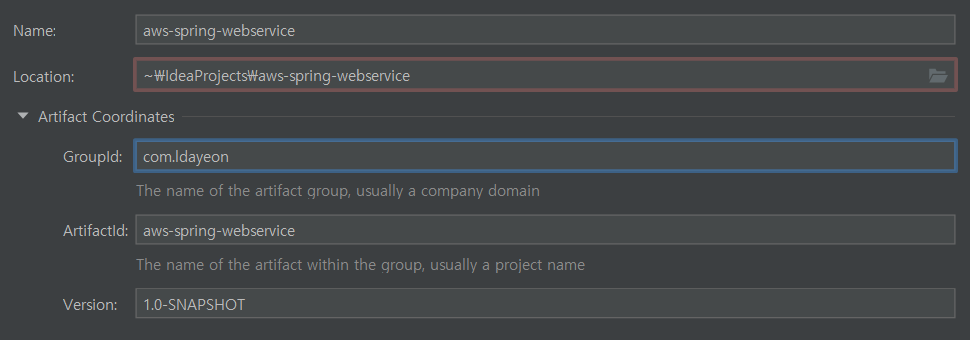
-
GroupId : 프로젝트를 구분하는 고유 식별 이름
- package 명명 규칙을 따라야 함
-
ArtifactId : 버전 정보를 생략한 jar 파일 이름
2. Gradle 프로젝트를 스트린 부트 프로젝트로 변경하기
Gradle과 Spring Boot
(1) Gradle
Gradle은 빌드 자동화 도구- Groovy 문법을 사용하기 때문에 XML문법 기반인
Maven보다 가독성 좋음 build.gradle파일에서 Library 의존성 설정
- Groovy 문법을 사용하기 때문에 XML문법 기반인
(2) Spring Boot
- Spring Boot :
Spring Framework의 설정에 대한 단점을 보완한 프로젝트- 자체 Tomcat 서버를 사용하기 때문에 따로 설정하지 않아도 됨
- 의존성 관리 자동화
build.gradle 설정
buildscript{
    ext{
        springBootVersion = '2.1.9.RELEASE'
    }
    repositories{
        mavenCentral()
        jcenter()
    }
    dependencies{
        classpath("org.springframework.boot:spring-boot-gradle-plugin:${springBootVersion}")
    }
}

apply plugin: 'java'
apply plugin: 'eclipse'
apply plugin: 'org.springframework.boot'
apply plugin: 'io.spring.dependency-management'

group 'com.aws.spring'
version '1.0-SNAPSHOT'

sourceCompatibility = 1.8

repositories {
    mavenCentral()
    jcenter()
}

dependencies {
    compile('org.springframework.boot:spring-boot-starter-web')
    testCompile('org.springframework.boot:spring-boot-starter-test')
}
- buildscript : Gradle의 저장소 및 의존성을 정의하는 블록으로 모든 모듈에 적용
- ext : build.gradle의 전역변수를 선언하는 블록
- repositories : 라이브러리를 다운받을 원격저장소 선택
- mavenCentral : 본인이 만든 하이브러리를 업로드하기 어렵
- jcenter : mavenCentral의 문제점을 개선하여 라이브러리 업로드 간단
- dependencies : 프로젝트에 필요한 의존성 선언
- 버전을 명시하지 않아야 위(ext블록)의 전역변수 사용
3. .gitignore 파일 설정
.ignore 파일
- GitHub에 업로드 시 특정 파일이나 폴더를 관리 대상에서 제외하는 설정을 저장한 파일
- Intellij에서는 기본적으로 제공하는 것이 없기 때문에
.ignore플러그인을 설치하여 사용
.gradle
.idea
위와 같이 .gradle 폴더와 .idea 폴더를 버전 관리에서 제외한다.
- .gradle 폴더 : Gradle이 사용하는 폴더로 task로 생성된 파일이 저장되는 폴더
- .idea 폴더 : Intellij의 IDE를 사용 시 해당 프로젝트의 설정값들이 저장되는 폴더
[참고] 참고 도서 : 스프링 부트와 AWS로 혼자 구현하는 웹 서비스 (이동욱 저)
Leave a comment